Collector
Synopsis
A Collector collects constraints from source code and produces an initial TModel.
Description
A Collector is a stateful object that provides all the functions described below to access and change its internal state. The global services provided by a Collector are:
- Register facts, calculators, and requirements as collected from the source program.
- Maintain a global (key,value) store to store global information relevant for the collection process. Typical examples are:
- Configuration information.
- The files that have been imported.
- Manage scopes.
- Maintain a single value per scope. This enables decoupling the collection of information from separate but related language constructs.
Typical examples are:
- While collecting information from a function declaration:
create a new function scope and associate the required return type with it so that return statements in the function body can check that
- they occur inside a function;
- that the type of their returned value is compatible with the required return type.
- While collecting information from an optionally labelled loop statement:
create a new loop scope and associate the label with it so that break/continue statements can check that:
- they occur inside a loop statement;
- which loop statement they should (dis)continue.
- While collecting information from a function declaration:
create a new function scope and associate the required return type with it so that return statements in the function body can check that
- Reporting.
The functions provided by a Collector are summarized below:
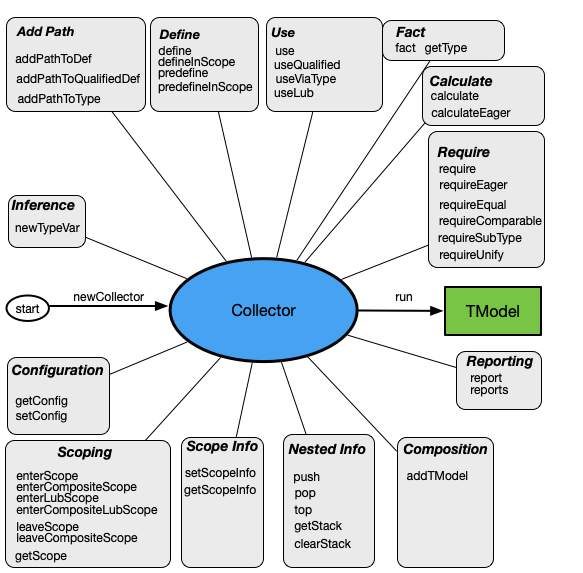
Three dozen functions are available that fall into the following categories:
- Lifecycle of Collector: create a new
Collector, use it tocollectinformation from a source program, and produce a TModel. - Configuration: retrieve or modify configuration settings.
- Scoping: enter or leave a scope, ask for current scope.
- Scope Info: add information to the current scope or retrieve that information.
- Nested Info: maintain nested information during collection; this is only available during collection.
- Composition: add another TModel to the current one.
- Reporting: report errors, warnings and info messages.
- Add Path: add paths to the scope graph.
- Define: define identifiers in various ways.
- Use: use identifiers in various ways.
- Inference: create new type variables for type inference.
- Facts: establish or retrieve facts.
- Calculate: define calculators.
- Require: define requirements.
Technically, Collector is a datatype with a single constructur and a number of functions as fields. For instance, given a Collector named c, calling the define function amounts to: c.define(_the-arguments-of-define_). All Collector functions are prefixed with /* Collector field */ to emphasize that they are a field of the Collector datatype.
LifeCycle of Collector
A new Collector is created using the function newCollector.
Collector newCollector(str modelName, Tree pt, TypePalConfig config = tconfig());
where
modelNameis the name of the TModel to be created (used for logging);ptis the parse tree of the source program to be type checked;configis a Configuration.
Once a Collector has been created, the user-defined collect function is invoked with the current parse tree of a source program and the Collector as arguments. The collect function is applied recursively until all information has been collected from the source program.
Finally, run creates the desired TModel that will be used by the Solver:
/* Collector field */ TModel () run;
A typical scenario is (for a given a parse tree pt of the program to be checked):
c = newCollector("my_model", pt);   // create Collector, default TypePalConfig
collect(pt, c);                     // collect constraints
model = c.run();                    // create initial TModel to be handled by the Solver
The collect function has to be supplied by the author of the type checker and looks like this:
void collect(LanguageConstruct lc, Collector c){ ... }
where:
lcis a syntactic type from the language under consideration.cis aCollector.
::: Caution
Each collect function is responsible for collecting constraints from its subtrees.
:::
Configuration
The Configuration can be retrieved or adjusted by the following two functions:
/* Collector field */ TypePalConfig () getConfig;
/* Collector field */ void (TypePalConfig cfg) setConfig;
The former returns the current TypePal configuration, the latter sets the current configuration to a new configuration.
Scoping
Scope management amounts to entering a new scope, leave the current scope and retrieving the current scope:
/* Collector field */ void (Tree inner) enterScope;
/* Collector field */ void (list[Tree] trees) enterCompositeScope;
/* Collector field */ void (Tree inner) enterLubScope;
/* Collector field */ void (list[Tree] trees) enterCompositeLubScope;
/* Collector field */ void (Tree inner) leaveScope;
/* Collector field */ void (list[Tree] trees) leaveCompositeScope;
/* Collector field */ loc () getScope,
In order to check consistency, leaveScope has the inner scope that it is supposed to be leaving as argument.
Here is a simple example how the let expression in the Fun language handles subscopes:
void collect(current: (Expression) `let <Id name> : <Type tp> = <Expression exp1> in <Expression exp2> end`, Collector c) {
     c.enterScope(current);
         c.define("<name>", variableId(), name, defType(tp));
         c.calculate("let", current, [exp2], AType(Solver s) { return s.getType(exp2); } );
         collect(tp, exp1, exp2, c);
     c.leaveScope(current);
}
A composite scope is a scope that corresponds with nonconsecutive parts of the source code and is represented by a list of Trees.
A lub scope is a scope in which the type of not explcitly declared variables is determined by the least-upper bound (LUB) of the types of their uses. Lub scopes are, for instance, used to implement local type inference in Rascal.
A composite lub scope is a scope that corresponds with nonconsecutive parts of the source code and locally infers the types in those scopes.
Scope Info
It is possible to associate auxiliary information with each scope. This enables the downward propagation of information during the topdown traversal of the source program by collect. Typical use cases are:
- recording the return type of a function declaration and checking that all return statements in the body of that function have a type that is compatible with the declared return type.
- recording the label of a loop statement for the benefit of nested break or continue statements.
Scopes are identified by their source location and ScopeRole: a user-defined data type that distinsguishes possible
roles such as functionScope() or labelScope().
setScopeInfo sets the information for a scope:
/* Collector field */ void (loc scope, ScopeRole scopeRole, value info) setScopeInfo;
where
scopeis the scope for which information is to be set.scopeRoleis the role of that scope.infois the associated information.
getScopeInfo retrieves associated scope information:
/* Collector field */ lrel[loc scope, value scopeInfo] (ScopeRole scopeRole) getScopeInfo;
where
scopeRoleis the role of the scope we are looking for.
getScopeInfo returns a list relation containing scope/scopeInfo pairs (ordered from innermost to outermost scope).
Let's illustrate ScopeInfo with a stripped down version of how the Rascal type checker handles while and break statements:
data LoopInfo = loopInfo(str name);     ❶

void collect(current: (Statement) `<Label label> while( <{Expression ","}+ conditions> ) <Statement body>`,  Collector c){
    c.enterScope(current);
        ...
        loopName = "<label.name>";
        c.setScopeInfo(c.getScope(), loopScope(), loopInfo(loopName));     ❷
        ...
    c.leaveScope(current);
}

void collect(current:(Statement) `break <Target target>;`, Collector c){
    ...
    loopName = "<target.name>"
    for(<scope, scopeInfo> <- c.getScopeInfo(loopScope())){     ❸
        if(loopInfo(loopName1) := scopeInfo){
            if(loopName == "" || loopName == loopName1){
                collect(target, c);
                return;
             }
        } else {
            throw rascalCheckerInternalError(getLoc(current), "Inconsistent info from loop scope: <scopeInfo>");
        }
    }
    c.report(error(current, "Break outside a while/do/for statement"));
}
- ❶ Introduces a data type to represent loop information.
- ❷ When handling a while statement, the current scope is marked as
loopScopeandloopInfois associated with it. - ❸ When handling a
breakstatement, we get all available ScopeInfo for loopScopes (innermost first) and check the associated loopInfo.
Nested Info
An arbitrary number of push down stacks can be maintained during the topdown traversal of the source code that is being type checked. A use case is recording that a certain syntax type is encountered and make children aware of this, e.g. "we are inside a parameter list".
Each stack has a string name (key) and is created on demand.
/* Collector field */ void (str key, value val) push
/* Collector field */ value (str key) pop,
/* Collector field */ value (str key) top,
/* Collector field */ list[value] (str key) getStack,
/* Collector field */ void (str key) clearStack,
push, pop, and top perform standard stack operations. push creates a stack when needed, while top and pop require the existence of the named stack. getStack returns all values in the named stack, while clearStack resets it to empty.
These stacks are stored in the global store, see Solver.
With the availability of a global store come serious responsibilities. Don't overuse it, do not misuse it.
Composition
TModels can be composed by adding the information from one TModel to the other. A use case is module composition.
/* Collector field */ void (TModel tm) addTModel;
addTModel adds the information in tm to the current Collector.
Reporting
One or more reports can be added by report and reports:
/* Collector field */ void (FailMessage fmsg) report;
/* Collector field */ void (list[FailMessage] fmgs) reports;
See Reporting for a description of FailMessage.
If one of the messages is error the execution of the current calculator or requirement is immediately terminated.
Add Path
TypePal is based on nested scopes and path between scopes. The former represent textual nesting as present in block structure and function scopes. The latter represent non-local semantic links between program parts as present in import statements between modules or Pascal's with statement. The following functions add to the scope graph a path from the current scope to another scope.
Add a path to a definition
/* Collector field */ void (Tree occ, set[IdRole] idRoles, PathRole pathRole) addPathToDef;
addPathToDef is typically used to create an import or extend path between program parts. occ is an occurence of a name that should be defined elsewhere in one of the given roles. The effect is to add a pathRole path between the current scope and the definition.
Here is an example taken from the language ModFun:
void collect(current: (ImportDecl) `import <ModId mid> ;`, Collector c){
     c.addPathToDef(mid, {moduleId()}, importPath());
}
Add a path to a qualified definition
/* Collector field */ void (list[str] ids, Tree occ, set[IdRole] idRoles, set[IdRole] qualifierRoles, PathRole pathRole) addPathToQualifiedDef;
Similar to addPathToDef for the occurrence of a qualified names rather than a simple name.
Add a path to a type
/* Collector field */ void (Tree occ, PathRole pathRole) addPathToType
occ is a parse tree with has a certain type. The effect is to add a pathRole path between the current scope and the definition of that type.
A prime example is type checking of Pascal's with statement which opens the definition of a record type and makes all defined fields available in the body of the with statement. Here we create a withPath between the scope of the with statement and all definitions of the record types of the given record variables:
void collect(current: (WithStatement) `with <{RecordVariable ","}+ recordVars> do <Statement withStat>`, Collector c){
    c.enterScope(current);
        for(rv <- recordVars){
            c.addPathToType(rv, withPath());
        }
        collect(recordVars, withStat, c);
    c.leaveScope(current);
}
Define
The function define adds the definition of a name in the current scope:
/* Collector field */ void (str id, IdRole idRole, value def, DefInfo info) define;
where:
idis the textual appearance of the name.idRoleis the role played by the name.defis the part of the parse tree that corresponds to the definition of the name.infois the definition information to be associated with this definition. See DefInfo.
The function defineInScope adds the definition of a name in a given scope:
/* Collector field */ void (value scope, str id, IdRole idRole, value def, DefInfo info) defineInScope
Predefine
Most languages depend on predefined names such as true, false, exp, and the like. The function predefine adds the definition of such a predefined name in the current scope:
/* Collector field */ void (str id, IdRole idRole, value def, DefInfo info) predefine;
The function predefineInScope adds the definition of a predefined name in a given scope:
/* Collector field */ void (value scope, str id, IdRole idRole, value def, DefInfo info) predefineInScope
Use
A use is an occurence of a name that has to be associated with a definition of that name. We distinguish the use of unqualified names (the bare name itself) and qualified names (a name that contains some prefix/qualifier).
Use an unqualified name
There are three functions to describe the occurrence of a name in a parse tree as a use. The most elementary use of a name is described by:
/* Collector field */ void (Tree occ, set[IdRole] idRoles) use,
The parse tree occ is a use to be resolved in the current scope in one of the given roles idRoles. The use of a variable in an expression is typically modelled with this use function.
Here is an example from the Calc language:
void collect(current: (Exp) `<Id name>`, Collector c){
    c.use(name, {variableId()});
}
Use a qualified name
Next we consider the use of qualified names, i.e., a list of identifiers that will be resolved from left to right. We will call these identifiers (except the last one) qualifiers and the last one the qualified identifier.
/* Collector field */ void (list[str] ids, Tree occ, set[IdRole] idRoles, set[IdRole] qualifierRoles) useQualified;
Here ids is the list of strings that form the qualified name, occ is the actual occurrence, and there are two sets of roles:
idRoles are the possible roles for the qualified identifier itself and qualifierRoles are the possible roles for the qualifiers.
Use a name via another type
Many languages support named types and names that can be defined inside such a named type. Examples are field names in records or method names in classes. useViaType handles the use of names defined in a named type:
/* Collector field */ void (Tree container, Tree selector, set[IdRole] idRolesSel) useViaType
where
container: has a named type as type.selector: is the name to be selected from that named type.idRolesSel: are the IdRoles allowed for the selector.
Here is an example of field selection from a record in the Struct language:
void collect(current:(Expression)`<Expression lhs> . <Id fieldName>`, Collector c) {
    c.useViaType(lhs, fieldName, {fieldId()});     ❶
    c.fact(current, fieldName);     ❷
    collect(lhs, c);
}
- ❶ Determine the type of
lhs, say T. Now look for a definition offieldName(asfieldId) in the definition of T. - ❷ The type of the whole expressions becomes the type of
fieldId.
useViaType can be configured with TypePalConfig's getTypeNamesAndRole and getTypeInNamelessType that
determine the precise mapping between a named or unnamed type and its fields.
UseLub
In some languages (think Rascal) local type inference and subtyping are needed to determine the type of variables: when no explicit definition is present, the type of these variables is inferred from their use and the least-upper-bound (LUB) of all the uses of a variable is taken as its type. The function useLub marks variable uses for which this regime has to be applied:
/* Collector field */ void (Tree occ, set[IdRole] idRoles) useLub
See the Rascal type checker for examples.
Inference
ATypes may contain type variables and new type variables can be created using newTypeVar:
/* Collector field */ AType (value src) newTypeVar;
Type variables can be bound via unification.
Here is an example of a call expression taken from the UntypedFun language:
void collect(current: (Expression) `<Expression exp1>(<Expression exp2>)`, Collector c) {
     tau1 = c.newTypeVar(exp1);
     tau2 = c.newTypeVar(exp2);

     c.calculateEager("application", current, [exp1, exp2],
        AType (Solver s) {
              s.requireUnify(functionType(tau1, tau2), exp1, error(exp1, "Function type expected, found %t", exp1));
              s.requireUnify(tau1, exp2, error(exp2, "Incorrect type actual parameter"));
              return tau2;
            });
      collect(exp1, exp2, c);
}
calculate and require are only evaluated when all their dependencies are available and they are fully instantiated, i.e., do not contain type variables.
calculateEager and requireEager are also only evaluated when all their dependencies are available but those may contain type variables.
The bindings that are accumulated during calculateEager or requireEager are effectuated upon successfull completion of that calculateEager or requireEager.
Fact
The function fact registers known type information for a program fragment src:
/* Collector field */ void (Tree src, value atype) fact;
where atype can be either an AType or a Tree. In the latter case the type of that Tree is used when available.
Here are two examples from the Calc language:
void collect(current: (Exp) `<Integer integer>`, Collector c){
    c.fact(current, intType());     ❶
}

void collect(current: (Exp) `( <Exp e> )`, Collector c){
    c.fact(current, e);            ❷
    collect(e, c);
}
- ❶ Registers the fact that the current expression has type
intType. - ❷ Registers the fact that the current expression has the same type as the embedded expression
e.
GetType
The function getType returns the type of a program fragment src (when available) and throws the exception TypeUnavailable otherwise:
/* Collector field */ void (Tree src) getType;
Calculate
A calculator computes the type of a subtree src by way of an AType-returning function calculator. A list of dependencies is given whose types have to be known before this calculator can be computed. There are two versions: for calculate all dependencies should be fully resolved and instantiated, while calculateEager can also handle dependencies that still contain type variables.
/* Collector field */ void (str name, Tree src, list[value] dependencies, AType(Solver s) calculator) calculate;
/* Collector field */ void (str name, Tree src, list[value] dependencies, AType(Solver s) calculator) calculateEager;
See A Calculator Language and Examples of Typecheckers for examples of calculator definitions.
See Inference for details about type variables.
Require
A requirement is a predicate regarding the type or properties of a source tree fragment src. There are two versions: for require all dependencies should be fully resolved and instantiated, while requireEager can also handle dependencies that still contain type variables.
/* Collector field */ void (str name, Tree src, list[value] dependencies, void(Solver s) pred) require;
/* Collector field */ void (str name, Tree src, list[value] dependencies, void(Solver s) pred) requireEager;
where
nameis the name of the requirement (for reporting purposes).dependenciesis a list of dependencies whose types have to be known before this requirement can be computed.predis a function that actually checks the requirement; when it is violated this will be reported via its Solver argument.
More specific requiremens can be expressed for checking that two subtrees or types are equal, comparable, that the one is a subtype of the other, or that they can be unified:
/* Collector field */ void (value l, value r, FailMessage fmsg) requireEqual;
/* Collector field */ void (value l, value r, FailMessage fmsg) requireComparable;
/* Collector field */ void (value l, value r, FailMessage fmsg) requireSubType;
/* Collector field */ void (value l, value r, FailMessage fmsg) requireUnify;
The arguments l and r should either be an AType or a subtree whose type is known.
See A Calculator Language and Examples of Typecheckers for examples of requirement definitions. See Inference for details about type variables.